
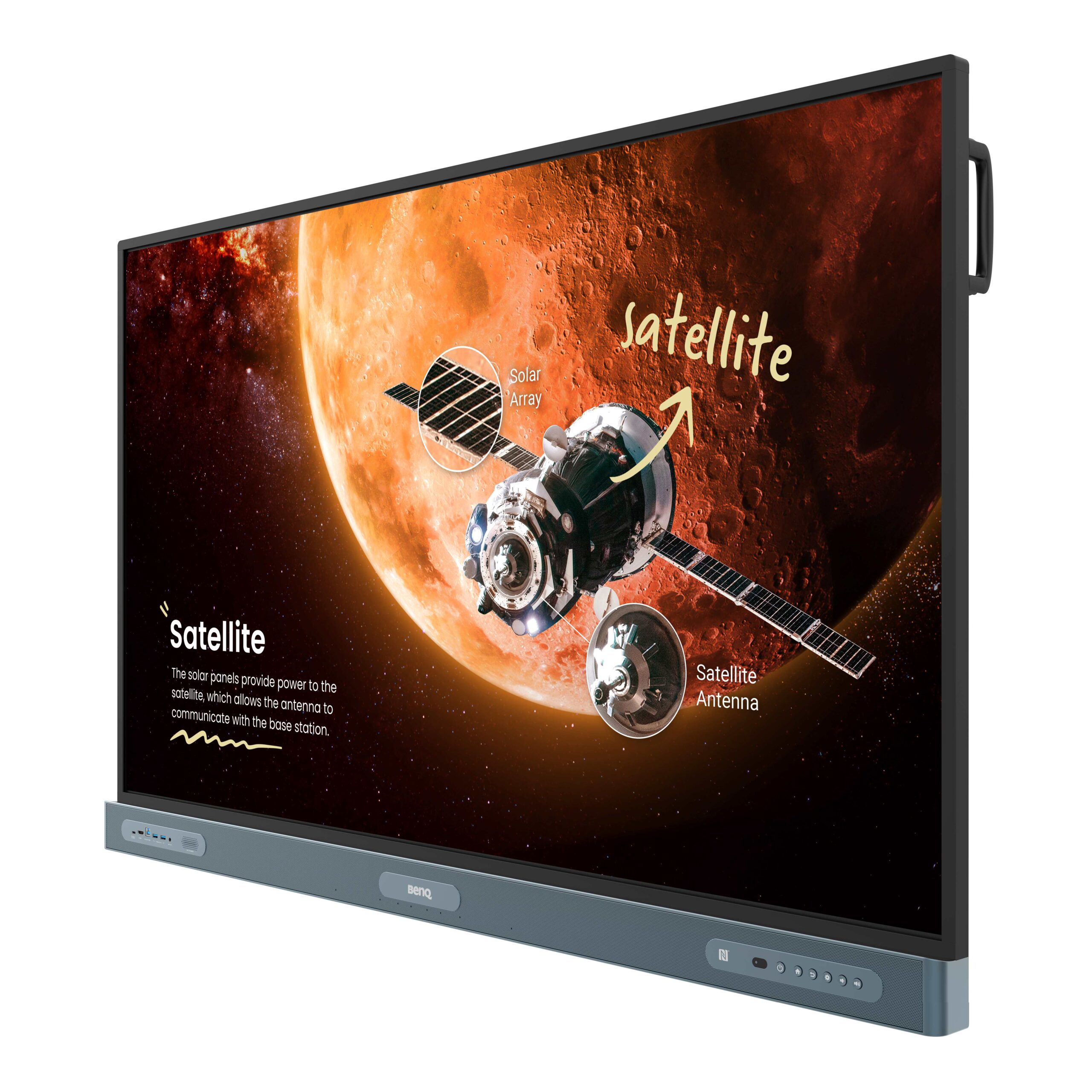
The BenQ Board Pro RP8604 is a premium 86-inch interactive display designed primarily for education, training environments and collaborative meeting spaces. As part of BenQ’s latest RP04 series, it combines a 4K touchscreen, Android 15 operating system, Google EDLA certification, extensive connectivity and advanced health-focused technologies into a single package.
For schools seeking a future-proof digital teaching solution, or businesses looking for a collaborative touchscreen display, the RP8604 positions itself among the most capable interactive panels currently available.
Design and Build Quality
At first glance, the RP8604 looks every bit a modern professional display. The slim bezels and anti-glare tempered glass create an attractive and highly practical screen surface suitable for bright classrooms and meeting rooms.
The 86-inch IPS panel offers excellent viewing angles and maintains colour consistency even when viewed from the side. The display has a typical brightness of 450 nits, making it easily visible in well-lit environments.
BenQ has also invested heavily in durability. The front glass incorporates a nano-ionic silver coating designed to inhibit bacterial growth, while the included pens and remote control also feature antimicrobial protection.
The panel itself feels exceptionally solid and is clearly designed to withstand years of daily educational use.
Stunning 4K Visual Performance
The RP8604 delivers Ultra HD 4K resolution (3840 x 2160 pixels), providing sharp text, detailed images and vibrant video playback.
Specifications include:
- 86-inch IPS panel
- 4K UHD resolution
- 10-bit colour depth
- 16:9 aspect ratio
- 8ms response time
- Anti-glare tempered glass
- Eyesafe® Certified 2.0 technology
- Flicker-free display technology
One of the standout features is its Eyesafe® 2.0 certification. BenQ claims this is the first interactive display of its type to achieve an RPF®50 rating, significantly reducing exposure to harmful blue light while preserving colour accuracy.
For teachers and pupils spending many hours looking at screens, this is a genuinely useful addition rather than simply another marketing specification.
Natural Writing Experience
Writing performance is arguably one of the most important aspects of an interactive whiteboard.
Fortunately, the RP8604 performs exceptionally well.
The display supports up to 50 simultaneous touch points, allowing multiple students or meeting participants to work together at once.
BenQ’s Ultra Precision IR technology provides:
- Low latency writing
- Smooth pen tracking
- Palm rejection
- Multi-user collaboration
- Responsive annotation capabilities
The experience feels remarkably close to writing on paper, making it highly suitable for mathematics, diagramming, brainstorming sessions and collaborative workshops.
Android 15 and Google EDLA Certification
Perhaps the biggest improvement in the RP04 generation is Google’s EDLA certification.
EDLA (Enterprise Devices Licensing Agreement) gives users direct access to:
- Google Play Store
- Google Drive
- Google Docs
- Google Sheets
- Gmail
- Chrome Browser
- Google Meet
- YouTube
Teachers can sign in using NFC cards and instantly access personalised settings, lesson materials and cloud storage.
Unlike previous interactive boards that relied on limited proprietary app ecosystems, the RP8604 benefits from the familiarity and flexibility of Google’s platform.
This dramatically reduces the learning curve for both teachers and administrators.
Powerful Hardware
Under the hood, the RP8604 offers impressive specifications.
It includes:
- Android 15 operating system
- 8-core processor
- 8GB RAM
- 128GB storage
- Mali-G57 graphics
- WiFi 6
- Bluetooth 5.2
- Gigabit Ethernet
Performance feels fast and responsive, even when running multiple applications simultaneously.
Navigation between apps is smooth, screen sharing is instantaneous and video playback remains fluid.
Excellent Connectivity
Connectivity is one area where BenQ has clearly attempted to eliminate frustration.
Ports include:
- 4 x HDMI 2.0
- HDMI output
- DisplayPort
- VGA
- Multiple USB-A ports
- USB-C with 100W Power Delivery
- USB-C with 65W charging
- USB-B Touch ports
- RJ45 Ethernet
- Optical audio output
- RS232
- OPS slot
The 100W USB-C connection is particularly useful.
A single cable can deliver:
- Video
- Audio
- Touch control
- Charging
This makes laptop connectivity incredibly straightforward.
Collaboration Features
BenQ includes several software tools designed to enhance teamwork.
EZWrite 6
A powerful digital whiteboarding application featuring:
- Handwriting recognition
- Templates
- Annotation tools
- Import and export options
InstaShare 2
Allows wireless presentation from laptops, tablets and smartphones.
Administrators can also:
- Approve participants
- Block unwanted sharing
- Hide screens
- Moderate content
AMS and DMS
Account and device management systems make large-scale deployment easier for schools with multiple displays.
IT departments will particularly appreciate these centralised management capabilities.
ClassroomCare Technology
BenQ continues to differentiate itself through its ClassroomCare package.
This includes:
Germ-resistant surfaces
Screen, pens and remote control all receive antimicrobial treatment.
Air quality sensors
The display can monitor:
- CO₂
- PM2.5
- PM10
- TVOC
- Humidity
- Temperature
Motion sensors
Power-saving functionality helps reduce unnecessary energy consumption.
While some organisations may never use these features, schools concerned about indoor environmental quality may find them genuinely beneficial.
Audio Performance
Integrated sound quality is better than expected.
The RP8604 includes:
- Two 20W speakers
- One 16W subwoofer
- Eight-microphone array
- Up to 8 metre voice pickup range
For classrooms, the onboard speakers are perfectly adequate and eliminate the need for separate audio systems in many installations.
Potential Drawbacks
No product is perfect.
Some buyers may wish to consider:
Premium pricing
The RP8604 sits firmly at the upper end of the interactive display market.
Large physical footprint
An 86-inch panel requires substantial wall space and professional installation.
Features may exceed requirements
Smaller schools or organisations may never utilise every collaboration or environmental monitoring feature.
Verdict
The BenQ Board Pro RP8604 is arguably one of the most complete interactive displays currently available.
Its combination of Google EDLA integration, Android 15, excellent writing performance, extensive connectivity, Eyesafe-certified technology and comprehensive collaboration tools makes it particularly attractive for schools seeking a long-term investment.
For organisations already heavily invested in Google Workspace, the RP8604 offers one of the most seamless interactive experiences currently on the market.
Rating: 9.4/10
Pros
✔ Excellent writing experience
✔ Full Google Play Store access
✔ Android 15 operating system
✔ Outstanding connectivity
✔ Eyesafe® 2.0 certification
✔ Strong collaboration software
✔ Antimicrobial and air-quality technologies
Cons
✖ Premium price point
✖ Requires significant installation space
✖ Some advanced features may be underutilised by smaller users
Overall, the BenQ Board Pro RP8604 is an exceptionally capable interactive display that successfully bridges traditional teaching methods with modern cloud-based collaboration, making it a compelling option for forward-thinking schools, colleges and businesses alike.
Specifications and features verified from BenQ product documentation and technical literature.