
What is a classroom visualiser?
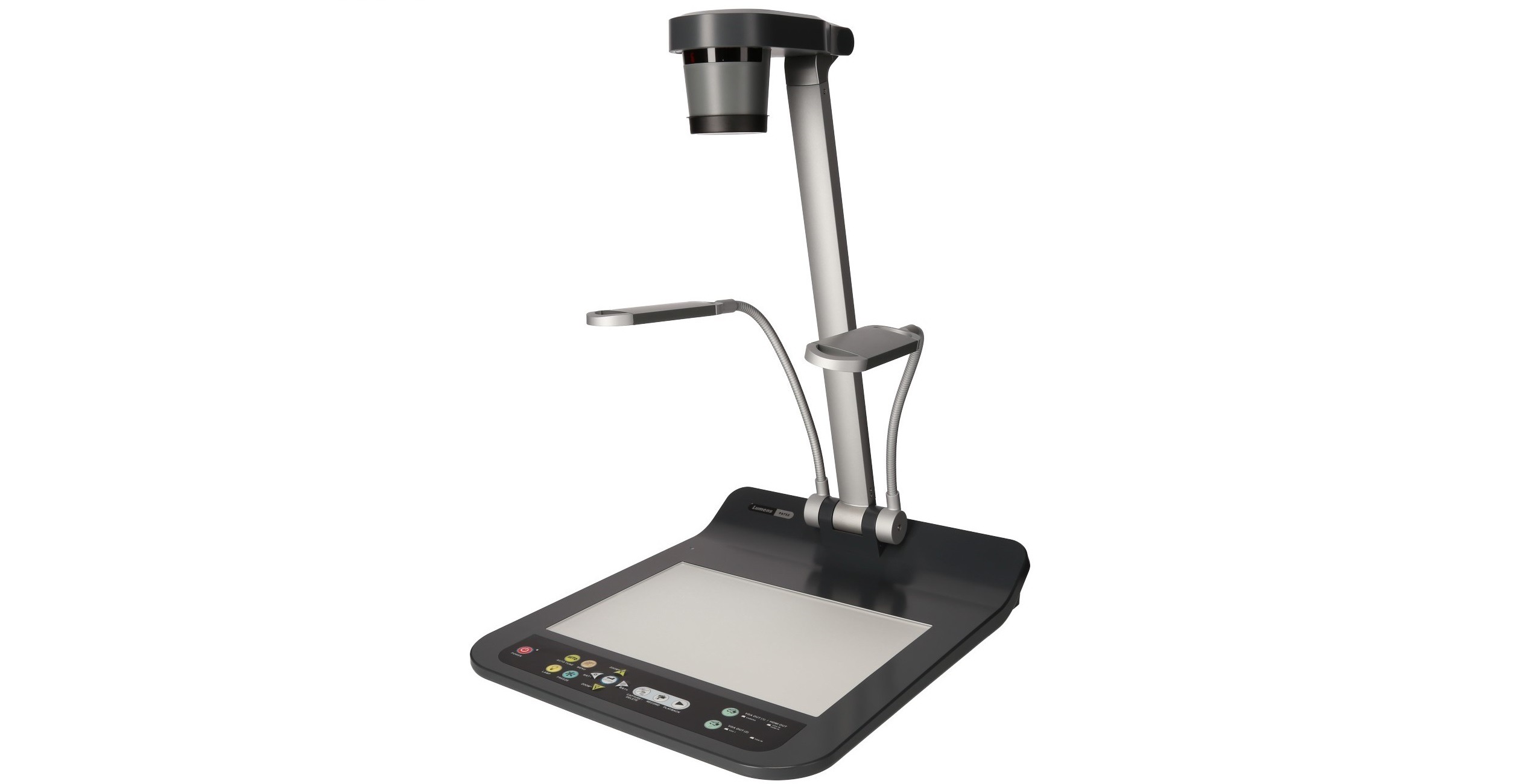
A classroom visualiser is a camera-based teaching tool that displays books, worksheets, handwritten notes, objects and practical demonstrations on a larger screen. It is sometimes called a document camera, but its role in a modern classroom is broader than simply showing documents. A teacher can use it to model a process, compare examples of work, magnify small details or record a demonstration for later use.
Modern visualisers connect to a classroom display, projector or computer using USB or HDMI. Most current models provide high-definition video, autofocus, zoom controls and image capture. The result is straightforward: the teacher places an item beneath the camera and every pupil can see it clearly without leaving their seat.
That simplicity is the main reason visualisers remain useful. They support familiar teaching methods rather than forcing staff to redesign every lesson around a new device or software platform.
Why visualisers are valuable in schools
Many education technology purchases promise transformation but create extra preparation and training. Visualisers are different because they solve a common classroom problem immediately: how to show the same physical resource to thirty pupils at once.
A primary teacher can model handwriting on ordinary paper while the class watches each stroke. A maths teacher can work through a calculation naturally rather than typing it into presentation software. A science teacher can enlarge a practical demonstration that would otherwise only be visible to pupils standing near the front bench.
Because the process is live, teachers can respond to questions and adjust the demonstration in real time. This helps maintain lesson pace and reduces the need to repeat instructions individually.
Common classroom uses
In English and literacy lessons, visualisers are useful for shared reading, text annotation and live feedback. Teachers can place a page beneath the camera, highlight key language and discuss structure without preparing a separate digital copy. Pupils can also present their own writing for peer review, allowing the class to discuss effective choices and common mistakes.
In mathematics, a visualiser supports worked examples. The teacher can write each stage of a calculation while explaining the reasoning behind it. This is especially useful where pupils need to see how a method develops rather than only the finished answer.
Science departments use visualisers to show experiments, specimens and small components. Art and design teachers can demonstrate drawing, cutting, modelling and construction techniques. In geography, history and religious studies, maps, source material and artefacts can be examined closely by the whole group.
The same device can therefore serve several departments, although schools should consider whether sharing equipment will limit regular use. A visualiser delivers the most value when it is available at the point of need rather than stored in a cupboard elsewhere.
Visualisers and interactive touchscreens
Visualisers work particularly well with interactive touchscreens. The visualiser provides the live image, while the touchscreen allows teachers or pupils to annotate, highlight and save what is being displayed. This combines the flexibility of physical resources with the convenience of digital teaching.
For example, a teacher can place a worksheet under the camera, circle an error on the touchscreen, add a note and save the annotated version. The class can then revisit the example later or receive a copy through the school learning platform.
This is more useful than treating each device as a separate purchase. When classroom technologies are specified to work together, staff face fewer technical barriers and are more likely to use the equipment consistently.
Benefits for teachers and pupils
For teachers, the clearest benefit is reduced preparation. Existing books, worksheets and handwritten materials become presentation resources instantly. There is no need to scan every page or recreate every example in slide software.
Visualisers also preserve natural teaching habits. Many teachers are more comfortable writing on paper, handling physical resources or demonstrating a process with their hands. A visualiser allows them to continue doing this while ensuring the whole class can follow.
For pupils, the benefit is clarity. Those at the back of the room see the same detail as those at the front. Step-by-step demonstrations are easier to follow, and the teacher can pause, zoom or repeat a movement when needed. This can be especially helpful for younger pupils and learners who benefit from explicit modelling.
Supporting SEND and accessibility
Visualisers can support pupils with additional needs by enlarging text, diagrams and objects. Magnification can reduce visual strain, while the ability to focus on one item at a time may help learners who find busy slides distracting.
Teachers can also slow demonstrations down, repeat stages and capture images for pupils who need to revisit instructions. These are modest adjustments, but they can make classroom materials more accessible without drawing unnecessary attention to individual pupils.
What to consider before buying
Image resolution matters because small text and fine detail must remain clear on a large display. Full HD is a sensible baseline for most schools. Optical zoom is useful where teachers need to enlarge objects without losing quality, while a flexible camera arm helps position the lens over books, models and practical work.
Connectivity should match the school’s existing equipment. USB is convenient when the visualiser will be used through a computer, while HDMI enables a direct connection to many displays and projectors. Staff should also check whether the device works with the operating systems and classroom software already in use.
Portability is another consideration. A lightweight model may be appropriate for departmental sharing, but repeated movement can reduce availability and increase the risk of damage. Fixed classroom models are easier for staff to adopt because they are always connected and ready.
Recording and image capture can be useful, but schools should avoid paying for features that staff will not use. The best specification is the one that suits actual teaching practice.
Installation and long-term use
A visualiser is simple to operate, but installation still affects whether it becomes part of everyday teaching. Poor positioning, trailing cables and confusing input selection can discourage use. Clear placement, tidy cabling and a consistent control process make adoption more likely.
Schools carrying out wider classroom improvements may include visualisers within professional audio visual installation services. This allows displays, sound, cabling and control systems to be planned as one environment rather than assembled through unrelated purchases.
Basic staff training should focus on everyday tasks: turning the device on, switching the display input, zooming, focusing and capturing an image. A short practical session is usually more useful than a lengthy technical manual.
Frequently asked questions
Are visualisers only useful in primary schools? No. They are widely used in secondary science, maths, art, design technology and humanities departments.
Can a visualiser replace an interactive display? No. The devices perform different roles and are strongest when used together.
Do teachers need specialist training? Most modern visualisers are straightforward. Staff normally need only brief guidance on connection, focus, zoom and image capture.
Should every classroom have one? Not necessarily. Schools should prioritise rooms and subjects where teachers regularly demonstrate physical materials or practical processes.
Conclusion
A classroom visualiser is not the most dramatic education technology purchase, but it is often one of the most practical. It improves visibility, supports familiar teaching methods and helps staff turn ordinary classroom resources into shared learning experiences.
For schools seeking a manageable upgrade with immediate classroom value, visualisers deserve serious consideration. The strongest results come when the device is easy to access, simple to operate and properly integrated with the wider display system.